Make Arabic Pad atau Membuat Tulisan ARAB di PC
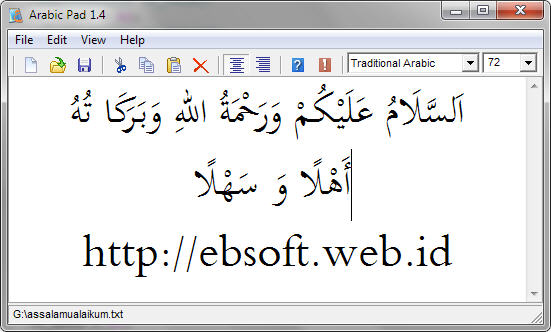
Writing Arabic with non Arabic windows or keyboard can be a frustrating jobs. But with Arabic Pad, this can be done easily. Arabic Pad is a simple editor like notepad, but designed to write Arabic [Unicode] text , especially for Non Windows Arabic. I hope that with this program write Arabic is more easily, by customizing the keyboard key so it’s close to the Arabic letter sound.
Setting your Computer (Windows 2000/XP)
Before you can using this program you must set your regional setting by add Supplemental language Support (right-to-left languages). If after run this program and the text doesn’t work correctly, the text were left aligned or the text were broken, then you must do the following step:
Open Control Panel
Select Regional and Language Options
select Languages tab
And check the options “Install files for complex script and right-to-left (Including Thai)” and click Apply.
Insert the Windows CD Installer and locate the correct path requested.
Follow the next step until the computer ask for restart, so restart.
If the above step still doesn’t work, maybe you have to install Universal Font. For Microsoft Office user, you can add Universal Font from the Installation CD. Follow this step :
Open Control Panel
Select Add or Remove Programs
Select Microsoft Office and click Change
Select Add of Remove Features click Next
In the next step, check the “Choose Advanced Customization of Applications” and click Next
From the tree view, Select: Office Shared Features > International Support > Universal Font(click/select and choose Run from my Computer from the drop down menu)
Click Update
Character Map
| Main Arabic Letters | |||||||
| Arabic | Key | Arabic | Key | Arabic | Key | ||
|---|---|---|---|---|---|---|---|
| ا | a | ز | z | ق | q | ||
| ب | b | س | s | ك | k | ||
| ت | t | ش | S | ل | l | ||
| ث | Z | ص | c | م | m | ||
| ج | j | ض | C | ن | n | ||
| ح | h | ط | p | و | w | ||
| خ | K | ظ | P | ه | h | ||
| د | d | ع | ‘ | ء | x | ||
| ذ | D | غ | g | ى | Y | ||
| ر | r | ف | f | ي | y | ||
| Arabic | Key | Arabic | Key | Arabic | Key | ||
|---|---|---|---|---|---|---|---|
| أ | E | ؤ | W | ة | T | ||
| إ | I | ئ | O |
| Harokat | |||||||
| Arabic | Key | Arabic | Key | Arabic | Key | ||
|---|---|---|---|---|---|---|---|
| Fatha َ | e | Fathatan ً | ee | Sukun ْ | o | ||
| Kasra ِ | i | Kasratan ٍ | ii | ٓ | ~ | ||
| Dhomma ُ | u | Dhammatan ٌ | uu | Hamza above ٔ | < | ||
| Inverted Dhamma ٗ | U | Shadda ّ | v | Hamza below ٕ | > | ||
| Superscript Alif ٰ | A | Subscript Alif ٖ | II | ||||
| Additional for JAWI | |||||||
| Arabic | Key | Arabic | Key | Arabic | Key | ||
|---|---|---|---|---|---|---|---|
| چ | J | ڤ | F | ۏ | V | ||
| ڠ | G | ڬ | X | ڽ | N | ||
For other text such as number ( 0 ..9 ), comma (,), dot (.), semicolon (;), Question mark(?), Percent sign(%), five pointed star (*), and underscore ( _ ) just equal with normal alphabet.
License
Arabic Pad was release as freeware. This software is provided ‘as-is’, without any express or implied warranty. In no event will the authors be held liable for any damages arising from the use of this software. Permission is granted to anyone to use, copy, distribute this software in any form freely except for commercial purpose.
History
Version 1.4 Sunday, July 03 2011
Some bugs when editing arabic and typing harakat were fixed
Fixed for Fathatan, dhommatan and Kasratan
Fixed double paste when using Ctrl+V
Fixed for alif + mad harakat above
Added new harakat : Inverted Dhamma, Subscript Alif
New help file (Arabic Pad Guide), now using html format
Version 1.03 Monday, September 10 2007
Add Arabic JAWI character ( used in Malaysia ) Cha, Nga, Pa, Gaf, Va and Nya ( req by Muhammad Zulkhibri Bin Musa)
Version 1.02 Tuesday, May 29 2007
Add more character such as : comma, semicolon, question mark, percent sign, five pointed star, underscore ( to extend the character ), alif with hamza above or bellow, ya with hamza above, waw with hamza above.
Version 1.01 Monday, May 28 2007
Fixed problem when load big files.
Icon disappeared
Version 1.00 Friday, May 25 2007
Initial Release
Download Arabic Pad
To download Arabic Pad ( 43 KB), select one of this download location :
Arabic Pad 1.4 (Latest release, DropBox)
Arabic Pad 1.4 (box.net)
Arabic Pad 1.4 (mediafire.com)
Arabic Pad 1.4 (jumbofiles.com)
